Why PDF to CAD Conversion Still Matters More Than We Admit
If you’ve worked in architecture, structural design, or MEP coordination long enough, you already know how often projects circle back to old drawings.
- An approved set from three years ago.
- A consultant-issued PDF with handwritten revisions.
- A scanned structural plan from a renovation project.
The drawing exists. The information is there. But it’s locked in a static file. That’s where PDF to CAD conversion becomes less of a drafting task and more of a workflow decision.
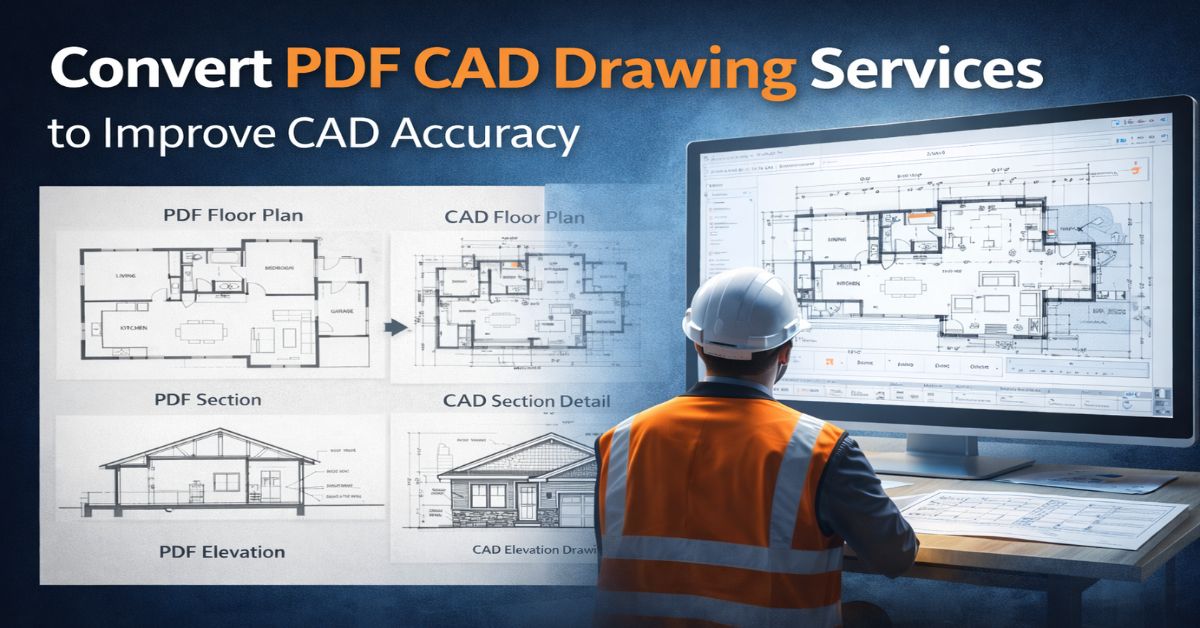
At its simplest, the process involves converting PDF drawings into editable DWG files a workflow many refer to as AutoCAD PDF to DWG. In reality, though, it’s rarely just a matter of pressing “import.”
The quality of conversion directly affects how quickly your team can move forward. When handled carefully, it saves hours of redrafting, protects dimensional accuracy, and makes future revisions manageable. When handled casually, it introduces subtle inconsistencies that show up late, usually during coordination. For AEC professionals managing tight schedules, optimizing this step is not optional. It’s operational hygiene.
Where PDF to CAD Conversions Usually Go Wrong?
On paper, conversion sounds straightforward. In practice, the source file dictates everything.
If the PDF was exported directly from CAD software and preserved as vector geometry, results tend to be cleaner. But many drawings circulating in project archives are scanned. They’re raster images embedded inside a PDF container.
That’s when complications start.
- Lines may import as fragmented segments.
- Text might break apart into individual shapes.
- Dimensions sometimes lose their true scale reference.
- Layers disappear entirely.
In these cases, what looks like a simple convert PDF to DWG task becomes partial reconstruction.
And reconstruction without verification is risky. The real issue isn’t the conversion tool. It’s assuming that imported geometry equals reliable geometry.
Understanding the Two Types of PDFs You’ll Encounter
Before optimizing anything, it helps to recognize what you’re working with.
Vector-based PDFs contain real linework data. These are usually exported from CAD or BIM software. When using AutoCAD’s PDF import tools or other DWG conversion services, the geometry can often be extracted reasonably well. Still, layers and annotations typically need reorganizing.
Raster PDFs are essentially scanned images. Converting these requires vectorization — either automated or manual. Even with good software, cleanup is unavoidable. Dimensions must be verified manually. Text often needs to be retyped.
Knowing which type you’re dealing with saves time before you even begin.
Preparing the Source File — The Step Most People Skip
Optimization starts before any conversion tool is opened.
- Check the PDF resolution. Zoom in. If line edges blur heavily, expect cleanup work. If dimensions are unclear, confirm whether reference measurements are available elsewhere.
- If multiple revisions exist, confirm you’re working with the latest version. Converting an outdated drawing wastes more time than redrafting.
- When possible, request the highest-quality PDF available from consultants or clients. A clean source file can reduce conversion time dramatically.
This stage isn’t technical. It’s practical. But it’s where accuracy begins.
Choosing the Right PDF to CAD Conversion Approach
There are several ways to handle PDF to CAD services.
- For vector PDFs, AutoCAD’s built-in import feature can be effective. However, import settings matter. Decisions about layer creation, object recognition, and scaling influence output quality.
- For raster PDFs, specialized software or experienced CAD drafting services may be necessary. Automated tools can assist, but they rarely deliver construction-ready results without manual refinement.
Some firms rely entirely on in-house teams. Others use professional DWG conversion services for bulk or complex drawing sets. The choice often depends on volume and internal capacity rather than technical difficulty alone.
The Layering Question — More Important Than It Seems
One of the quiet benefits of proper PDF to CAD conversion is restored layer structure.
Many PDFs flatten information. Walls, dimensions, hatches, and text appear visually separated but technically merged. When converted without rebuilding layers, editing becomes inefficient. Reassigning layers thoughtfully during conversion pays off later. It allows:
- Cleaner printing
- Faster editing
- Easier coordination with structural and MEP backgrounds
- Smoother integration into BIM workflows
Good CAD drafting services treat layer reconstruction as part of the conversion but not an afterthought.
DWG Verification: The Step That Protects You Later
No matter how clean the import looks, verification is essential.
- Check key dimensions against known references.
- Confirm grid spacing.
- Review alignment of major structural elements.
- Compare the DWG file visually with the original PDF.
It doesn’t take long. But skipping this step can cost hours during coordination meetings. One of the most common problems with AutoCAD PDF to DWG conversions is subtle scaling drift. Even small discrepancies become visible when integrated with other models.
Treat verification as mandatory, not optional.
Why Optimization Improves Real Project Outcomes
When PDF to CAD conversion is handled properly, the benefits are practical.
Drafting accuracy improves because geometry is verified.
Manual redrawing decreases, saving time.
Design revisions become easier because files are editable.
Coordination between architecture, structure, and MEP improves.
DWG integration into BIM platforms becomes more reliable.
These improvements rarely generate headlines. But they reduce friction across the project lifecycle.
Common Mistakes That Continue to Cause Problems
Despite available tools, certain habits still undermine accuracy.
- Using low-resolution scans and expecting precise results.
- Ignoring scale checks after import.
- Failing to rebuild logical layer structures.
- Leaving broken vectors or duplicate lines uncleaned.
- Relying solely on automated settings without review.
Most of these errors stem from rushing the process. And in many cases, they surface later — when correcting them is more disruptive.
Where PDF to CAD Conversion Delivers the Most Value?
Some industries rely heavily on optimized conversion.
- Architectural practices often revisit legacy plans for renovations.
- Structural engineers update existing layouts for load modifications.
- MEP teams integrate older building documentation into coordination models.
- Real estate developers prepare as-built documentation for resale or upgrade.
- Facility managers modernize archives for digital asset tracking.
In renovation and retrofit projects especially, the ability to convert PDF to DWG accurately allows teams to move forward without rebuilding everything from scratch.
When CAD Outsourcing Makes Sense?
There’s no universal rule for outsourcing PDF to CAD conversion services. But certain scenarios justify it.
- Large drawing sets with tight deadlines.
- Renovation projects involving multiple legacy PDFs.
- Bulk archive modernization programs.
- Internal teams already stretched by live design work.
Professional cad conversion services bring structured review processes and experience with both vector and raster files. For complex projects, that consistency can stabilize schedules.
Outsourcing isn’t about replacing internal teams. It’s about balancing workload.
Final Thoughts
PDF to CAD conversion is often treated as a minor technical task. In reality, it influences how smoothly projects move forward.
When optimized carefully, starting with source file preparation, followed by structured conversion, layer rebuilding, and dimension verification — static PDFs become reliable CAD assets.
For AEC professionals managing coordination-heavy projects, that reliability reduces rework, strengthens collaboration, and protects timelines. Old drawings don’t need to slow new projects. With the right approach, they become usable again.
Frequently Asked Questions By Our Clients
Can dimensions from a PDF be trusted after conversion to CAD?
Not automatically. Even with clean vector files, scale should be verified before relying on measurements for coordination or construction.
How can I improve accuracy in PDF to CAD conversion?
Start with high-resolution PDFs, confirm scale during import, rebuild layers logically, and perform manual checks after conversion
What industries benefit most from optimized PDF to CAD conversion?
Architecture, structural engineering, MEP design, renovation projects, facility management, and real estate development all rely heavily on accurate CAD-ready documentation.
When should you outsource PDF to CAD conversion services?
Outsourcing is helpful when managing bulk conversions, tight deadlines, legacy documentation, or when internal teams lack capacity for detailed cleanup.



Email Us
Let's Talk
USA - (+1) 760 514 0172
INDIA - (+91) 63502 02061